


When I try a VPN, I am not only looking for a large connection button. I want to understand what the app lets me control, what it asks me to approve, and whether its simple design helps or hides important decisions. Fast VPN: Secure Speedy Proxy takes a straightforward approach: it is a free productivity app from Fast Proxy Dev Lab that focuses on connecting quickly, selecting a server, and adding a layer of privacy when I use the internet.
That narrow purpose is useful. I do not need a complicated dashboard every time I want to protect a connection on public Wi-Fi or reach a website while traveling. At the same time, a short setup can make it harder to judge the service behind the button. My experience with this app is therefore positive but careful: it is easy to approach, yet I would still make privacy decisions deliberately rather than treating any VPN as automatic protection for everything online.
What the app is really like to use
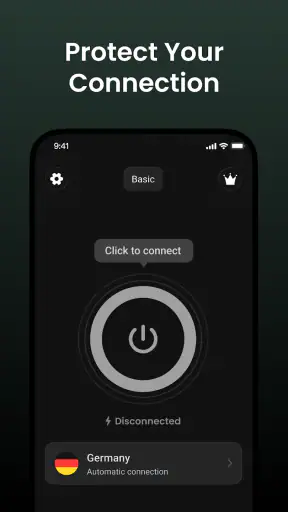
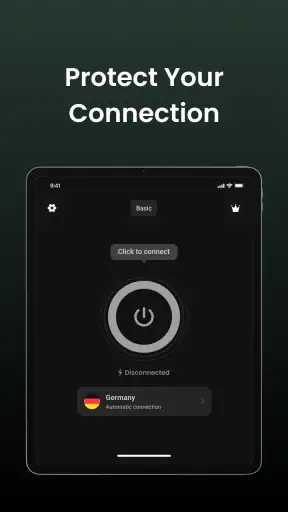
The first impression is built around speed of access. The app’s store summary emphasizes connecting in one tap, choosing a server, and helping protect online privacy. In practical terms, that makes it suitable for people who do not want to learn VPN terminology before using one. I can open it, look for a server choice, and start from the main connection flow instead of navigating through a crowded productivity suite.
I see the productivity label as a description of convenience rather than office work. This is not an editor, task manager, or note-taking tool. Its productive value comes from reducing the steps between opening the app and securing a connection. If I am about to join a café network, check a work portal from a hotel, or use a phone on an unfamiliar connection, a compact workflow is more helpful than a long list of technical settings.
The developer is Fast Proxy Dev Lab, and the app is free to install. That removes the most obvious barrier for a first trial, especially for someone who only occasionally needs a VPN. The audience rating is Everyone, which matches the general-purpose nature of the utility. I would still explain to younger or less technical users that a VPN is not the same as antivirus protection, anonymous browsing, or a guarantee that every website is safe.
Its current release is version 3.2.5, and it requires Android 8.0 or later. That requirement makes it relevant to many Android phones still in everyday use, while owners of older devices should check compatibility before planning around it. The app has passed the early-experiment stage in terms of public attention: it has more than a million installs and an average rating of 4.9 from roughly thirty-three thousand ratings. Those figures make it worth considering, but they do not replace my own check of the connection experience and privacy choices.
A realistic everyday test
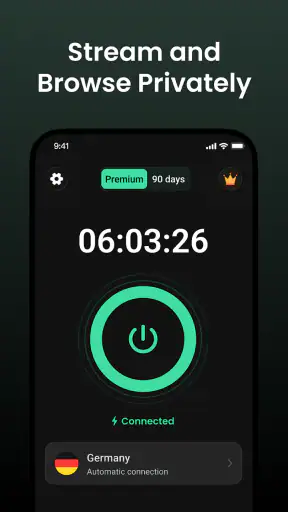
Imagine I am working from a hotel lobby and need to read a document or send a message. I would first connect to the hotel network, open Fast VPN: Secure Speedy Proxy, choose a nearby server if the selection offers one, and connect before opening the sensitive service. The useful part is the order: connect the phone to Wi-Fi, start the VPN, then begin the task. I would disconnect when finished instead of leaving the VPN running without a reason, particularly if I am trying to conserve battery or avoid unnecessary background activity.
That routine also reveals an important limitation. A VPN can protect the route between the device and the VPN service, but it does not make a weak password strong, remove phishing risks, or protect information I voluntarily enter into a fraudulent website. I would still use HTTPS, multi-factor authentication, and sensible account habits. The app is one layer in a safer connection, not a complete security plan.
Server choice matters more than the one-tap promise
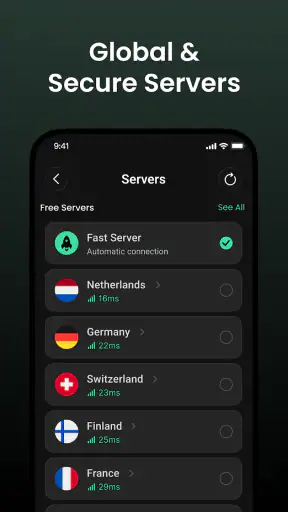
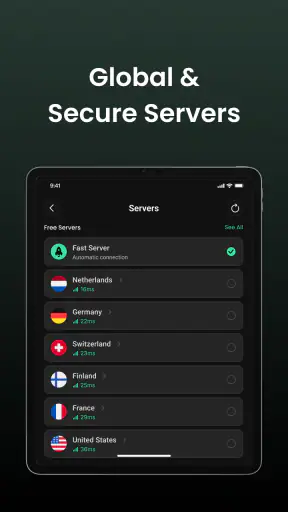
The one-tap design is convenient, but the server selector deserves attention. When I need the best chance of a responsive connection, I would normally start with a location geographically close to me. When I need a service that behaves as though I am in another region, I would choose a location for that specific purpose and accept that performance may change. Those goals can conflict: the nearest server is often the practical choice for speed, while a distant location may be the relevant choice for access.
I would not automatically assume that the first server shown is ideal for every activity. A connection that feels fine for reading may feel less comfortable for a video call, cloud backup, or large download. If the app makes server switching easy, trying another available location can be a sensible troubleshooting step. If it does not expose deeper connection information, I would judge it by the task itself rather than chasing a number that the interface does not show.
This is one place where a dedicated premium VPN may be better for advanced users. Those services often compete on detailed location coverage, protocol controls, specialized servers, and support tools. Fast VPN: Secure Speedy Proxy is more appealing when I value a low-friction connection over a large technical toolbox. I would not choose it as my first option for complex corporate networking, detailed routing rules, or a workflow that depends on fine-grained configuration.
Trust, controls, and privacy decisions
What I can verify from the experience
The visible user choice is clear at the center of the app: connect or do not connect, and select a server as part of that decision. That is a good starting point because the app does not require me to pretend that every situation needs the same location. I can make a basic choice based on where I am and what I am doing.
However, a simple control should not be confused with complete transparency. The app’s short description calls it “Fast VPN,” while the fuller summary focuses on connection speed, server selection, and online privacy. Those statements explain the intended job, but they do not by themselves answer every trust question a privacy-conscious user may have. I would inspect the app’s permission prompts, privacy information, and account-related screens on my own device before using it for highly sensitive activity.
That approach is especially important because a VPN changes where internet traffic is routed. I would pay attention to any request that seems unrelated to establishing or managing the connection. If the app presents a system VPN approval screen, I would read it rather than tapping through automatically. I would also note whether the app asks me to create an account, whether it offers a sign-out or account-removal path, and whether its settings let me control notifications or other ongoing behavior.
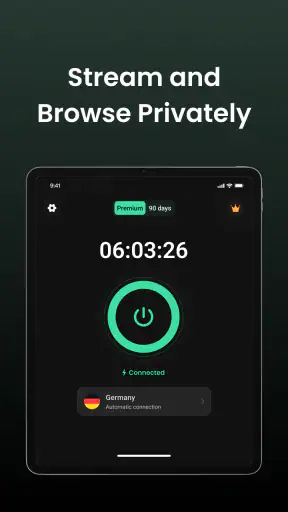
These are not abstract details. They determine how much agency I have after installation. A useful privacy app should make it understandable when the connection is active and should not force me to guess whether I am still protected. If the interface clearly changes state, that reduces accidental use of an unprotected connection. If the state is easy to miss, I would be more cautious before handling banking, work credentials, or personal documents.
Data-sensitive moments deserve extra care
The most sensitive moment is not necessarily the initial tap. It is the point when I decide to trust the connection with a real account. Before doing that, I would check the Android permission dialog and any in-app privacy explanation, then decide whether the requested access fits the VPN’s job. I would avoid granting unrelated permissions simply because I want to reach the main screen quickly.
I would also separate two questions that are often mixed together. The first is whether the VPN connection is active. The second is what the service does with information associated with using it. The connection indicator can help with the first question, but it does not answer the second. For that reason, I would review the app’s current privacy disclosures and make my own decision about whether the service is appropriate for sensitive browsing.
My cautious workflow would be to test the app first with low-risk browsing, observe how the connection starts and stops, and only then decide whether it fits more personal use. I would not begin with a banking session or a work account. I would also disconnect before changing networks if the app’s behavior becomes unclear, then reconnect after the new network is established. That small habit prevents me from assuming that a previous VPN state automatically covers every network transition.
Another practical point is that VPNs can affect services that depend on location or network reputation. A banking app, streaming service, ticketing site, or workplace login may react differently when traffic comes from a VPN server. If a legitimate service asks me to verify my identity again or blocks a session, I would not keep switching servers blindly. I would first decide whether the VPN is necessary for that task and, if not, disconnect temporarily and retry through the normal connection.
Who gets the most value from it
I think this app is best for Android users who want a simple privacy utility for occasional public-network use. It suits someone who finds full-featured VPN products intimidating, wants to choose a server without learning advanced networking, and prefers a free starting point. It can also work for a traveler who wants a repeatable routine: join the network, open the app, select a sensible location, connect, and then browse.
It is less convincing for somebody who expects a VPN to solve every privacy concern automatically. If I needed a clearly documented business service, family-wide management, detailed device coverage, or a broad set of expert controls, I would compare it with established alternatives before relying on it. The same applies if my main goal is consistent performance for demanding media or real-time communication. A simple app may be enough, but the cost of a poor connection can be higher in those situations.
I would also skip it for tasks where I cannot afford uncertainty about compatibility. Work systems sometimes require a particular VPN protocol, a managed profile, or a company-approved provider. In that setting, a consumer-focused one-tap utility is not an appropriate substitute. The right choice is the service and configuration required by the organization, even if another app looks faster to install.
How it compares with ordinary alternatives
The most obvious alternative is using the phone’s normal connection without a VPN. That is simpler and may be faster, but it gives me fewer privacy layers on an unfamiliar network. Fast VPN: Secure Speedy Proxy is more useful when I am connecting through shared Wi-Fi and want a quick, visible action before browsing. The trade-off is that I am adding another service between my device and the destination, so trust and performance become part of the decision.
A second alternative is a browser with built-in privacy tools. That can be convenient when I only care about web pages inside that browser, but it may not cover other apps on the phone in the same way a system VPN connection can. I would choose the browser option for a narrow browsing habit and this app when I want the VPN workflow to apply more broadly to the device’s connection.
The third alternative is a paid VPN with a larger settings panel. I would favor that route when I need clearer account administration, more specialized locations, stronger support expectations, or advanced controls. I would favor Fast VPN: Secure Speedy Proxy when I want to avoid subscriptions and do not need to tune every aspect of the connection. Free access is attractive, but I would not let the lack of a payment screen be my only measure of value.
Small habits that make the app more useful
My first tip is to decide the server location before starting a sensitive task, not halfway through it. Switching during a login or upload can interrupt the session and create confusing security prompts. My second is to keep a simple mental distinction between privacy and anonymity. The app can help change the route of a connection, but I would still avoid sharing unnecessary personal information and would continue using secure account practices.
My third tip is to treat connection failure as information rather than an invitation to tap repeatedly. I would check whether the phone still has internet access, try a different available server, and see whether another app is causing the problem. If a particular service fails only while the VPN is active, I would decide whether that service or the VPN is more important for the moment. That is more reliable than assuming every failure means the app is broken.
Finally, I would review the app after updates instead of assuming that the interface and choices remain exactly as I remember them. The current version is 3.2.5, and keeping an app current can be sensible, but an update is also a good moment to look again at visible permissions, notifications, connection behavior, and account controls. A privacy decision should be renewed when the software changes, especially if the app becomes part of my regular travel routine.
My cautious verdict
Fast VPN: Secure Speedy Proxy earns my recommendation as an approachable first VPN for everyday Android use, particularly when the goal is a quick connection on public Wi-Fi rather than advanced network management. Its free entry point, clear server-selection idea, and uncomplicated workflow make it less intimidating than many feature-heavy alternatives. The strong public response, with an average of 4.9 from around thirty-three thousand ratings, reinforces that many users find the basic experience appealing.
My recommendation comes with boundaries. I would use it as one privacy measure, not as proof that every online activity is safe. I would read each permission prompt, check the app’s current privacy information, watch for clear connection status, and test it with low-risk browsing before trusting it with important accounts. If those choices feel understandable on my device, the app is a practical fit for casual protection.
The best reason to choose it is control without clutter; the best reason to hesitate is that a simple VPN still deserves serious trust checks. For a person who wants one quick action and sensible server selection, I think it is worth trying. For a professional, organization-managed phone, or privacy enthusiast who needs extensive configuration and documented controls, I would look beyond this compact option before making it the foundation of my online security.


